

Python 100 Days Day40 Big Data Platform and HiveSQL
19 Sep 2022 | beginner pythonauthor: jackfrued
Hive簡介
Hive是Facebook開源的一款基於Hadoop的數據倉庫工具,是目前應用最廣泛的大數據處理解決方案,它能將SQL查詢轉變為 MapReduce(Google提出的一個軟件架構,用於大規模數據集的並行運算)任務,對SQL提供了完美的支持,能夠非常方便的實現大數據統計。
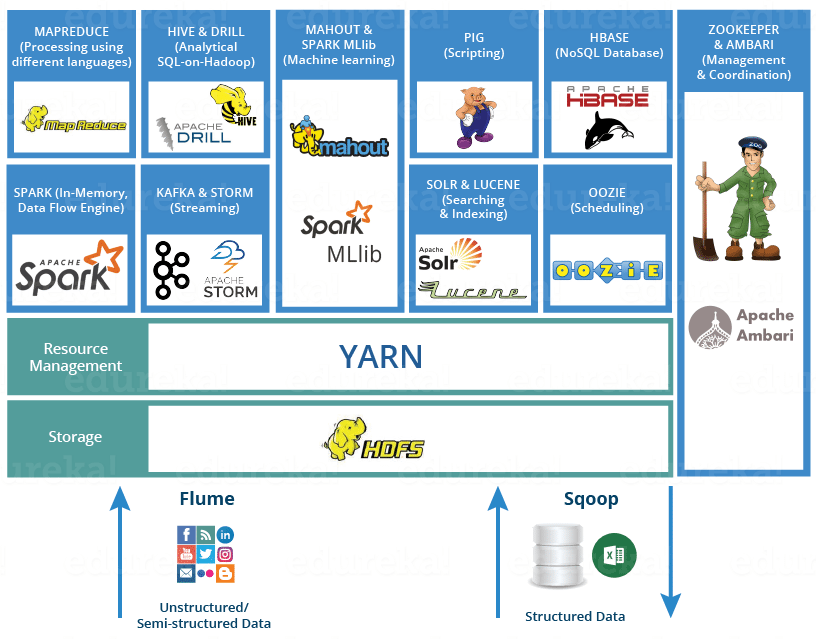
說明:可以通過https://www.edureka.co/blog/hadoop-ecosystem來了解Hadoop生態圈。
如果要簡單的介紹Hive,那麽以下兩點是其核心:
- 把HDFS中結構化的數據映射成表。
- 通過把Hive-SQL進行解析和轉換,最終生成一系列基於Hadoop的MapReduce任務/Spark任務,通過執行這些任務完成對數據的處理。也就是說,即便不學習Java、Scala這樣的編程語言,一樣可以實現對數據的處理。
Hive和傳統關系型數據庫的對比如下表所示。
| Hive | RDBMS | |
|---|---|---|
| 查詢語言 | HQL | SQL |
| 存儲數據 | HDFS | 本地文件系統 |
| 執行方式 | MapReduce / Spark | Executor |
| 執行延遲 | 高 | 低 |
| 數據規模 | 大 | 小 |
準備工作
-
搭建如下圖所示的大數據平台。

-
通過Client節點訪問大數據平台。

-
創建文件Hadoop的文件系統。
hadoop fs -mkdir /data hadoop fs -chmod g+w /data -
將準備好的數據文件拷貝到Hadoop文件系統中。
hadoop fs -put /home/ubuntu/data/* /data
創建/刪除數據庫
創建。
create database if not exists demo;
或
hive -e "create database demo;"
刪除。
drop database if exists demo;
切換。
use demo;
數據類型
Hive的數據類型如下所示。
基本數據類型。
| 數據類型 | 占用空間 | 支持版本 |
|---|---|---|
| tinyint | 1-Byte | |
| smallint | 2-Byte | |
| int | 4-Byte | |
| bigint | 8-Byte | |
| boolean | ||
| float | 4-Byte | |
| double | 8-Byte | |
| string | ||
| binary | 0.8版本 | |
| timestamp | 0.8版本 | |
| decimal | 0.11版本 | |
| char | 0.13版本 | |
| varchar | 0.12版本 | |
| date | 0.12版本 |
覆雜數據類型。
| 數據類型 | 描述 | 例子 |
|---|---|---|
| struct | 和C語言中的結構體類似 | struct<first_name:string, last_name:string> |
| map | 由鍵值對構成的元素的集合 | map<string,int> |
| array | 具有相同類型的變量的容器 | array<string> |
創建和使用表
-
創建內部表。
create table if not exists user_info ( user_id string, user_name string, sex string, age int, city string, firstactivetime string, level int, extra1 string, extra2 map<string,string> ) row format delimited fields terminated by '\t' collection items terminated by ',' map keys terminated by ':' lines terminated by '\n' stored as textfile; -
加載數據。
load data local inpath '/home/ubuntu/data/user_info/user_info.txt' overwrite into table user_info;或
load data inpath '/data/user_info/user_info.txt' overwrite into table user_info; -
創建分區表。
create table if not exists user_trade ( user_name string, piece int, price double, pay_amount double, goods_category string, pay_time bigint ) partitioned by (dt string) row format delimited fields terminated by '\t'; -
設置動態分區。
set hive.exec.dynamic.partition=true; set hive.exec.dynamic.partition.mode=nonstrict; set hive.exec.max.dynamic.partitions=10000; set hive.exec.max.dynamic.partitions.pernode=10000; -
拷貝數據(Shell命令)。
hdfs dfs -put /home/ubuntu/data/user_trade/* /user/hive/warehouse/demo.db/user_trade -
修覆分區表。
msck repair table user_trade;
查詢
基本語法
select user_name from user_info where city='beijing' and sex='female' limit 10;
select user_name, piece, pay_amount from user_trade where dt='2019-03-24' and goods_category='food';
group by
-- 查詢2019年1月到4月,每個品類有多少人購買,累計金額是多少
select goods_category, count(distinct user_name) as user_num, sum(pay_amount) as total from user_trade where dt between '2019-01-01' and '2019-04-30' group by goods_category;
-- 查詢2019年4月支付金額超過5萬元的用戶
select user_name, sum(pay_amount) as total from user_trade where dt between '2019-04-01' and '2019-04-30' group by user_name having sum(pay_amount) > 50000;
order by
-- 查詢2019年4月支付金額最多的用戶前5名
select user_name, sum(pay_amount) as total from user_trade where dt between '2019-04-01' and '2019-04-30' group by user_name order by total desc limit 5;
常用函數
from_unixtime:將時間戳轉換成日期unix_timestamp:將日期轉換成時間戳datediff:計算兩個日期的時間差if:根據條件返回不同的值substr:字符串取子串get_json_object:從JSON字符串中取出指定的key對應的value,如:get_json_object(info, '$.first_name')。
Comments